Script & Shell Development
Introduction
Script & Shell was a project made for my GAM301 module in my third year at university, which was made with an essay report. The full report can be read here. The module focused on “Experience design”, and we were tasked with creating an artifact using our specialist skills in one of four areas:
- Games for learning – How games can be used to teach players skills and knowledge, as well as how games are used to introduce learners to new domains of knowledge.
- Immersive Experiences – How game technologies and development approaches are used to create rich immersive experiences in physical spaces.
- Games for Change and Persuasive Games – How games are used to convey ideas and to prompt people to consider new ways of thinking, or to introduce them to important subjects.
- Games for Commercial and Business Applications – How the patterns and approaches of game design are used to develop more satisfying and rewarding commercial experiences.

The domain I decided to create a project for was “Games for learning”. I chose this as I had always been involved heavily with programming games as a child. I even ran a club in primary school for the online programming tool “Scratch”. I wanted to create an experience that was similar, and a tool to teach programming skills in children. I also wanted to add an innovative feature to make it stand out from similar games.
Designing a Unique Experience
I decided to create a prototype for a simple programming game. Using coloured “blocks” of code, players must control a tank and lead it to and destroy all targets on a small puzzle board. Players are given a certain amount of code blocks and must organise them into the correct order to solve the puzzle.
I wanted to attempt to fill a niche in this genre by focusing on sensory-based learning, using sound design, controller vibration and colour-coded blocks of code. I aimed to help reinforce learning by engaging different sensory modalities, catering to diverse learning styles, while also making the game accessible to children with dyslexia and other learning disabilities through use of sensory-based learning. Each action in game should be reflected to the player using multiple senses. Each action will have a visual indicator, a sound, and a controller vibration pattern all unique to that particular action and its result (e.g. a tank moving forward successfully and the tank moving into a wall have different sound effects and vibrations of different intensities).
Unlike other games in the domain, “Script and Shell” focuses on using multisensory feedback to reinforce learning. The use of sound, colour and touch have been proven methods to help retain knowledge. I hope that the implementation of these methods in my project will help it stand out from similar projects and help it achieve its goals of teaching programming concepts and computational thinking.
Considering scope and my skills, I focused on creating three levels with straightforward mechanics, such as navigating a grid and firing at targets. The main challenge for the player would be navigating the environment to reach their target – I decided this would be a good idea to help teach concepts such as conditionals and loops. I decided to use Gamemaker Studio 2 for this project. It’s a tool I am familiar with, and its simple 2D capabilities would make it perfect for this prototype which should prioritise functional mechanics over graphics. It was also a great pick as I am well-versed on implementing sound effects and controller vibration in the engine. I decided I would use the SFXR tool to generate my sound effects, as it’s a very easy tool to use, and would provide me with some solid sound effects to help give proper feedback to the player. I am also well experienced with this tool, and use it in almost all my projects, as despite its age it is very effective.
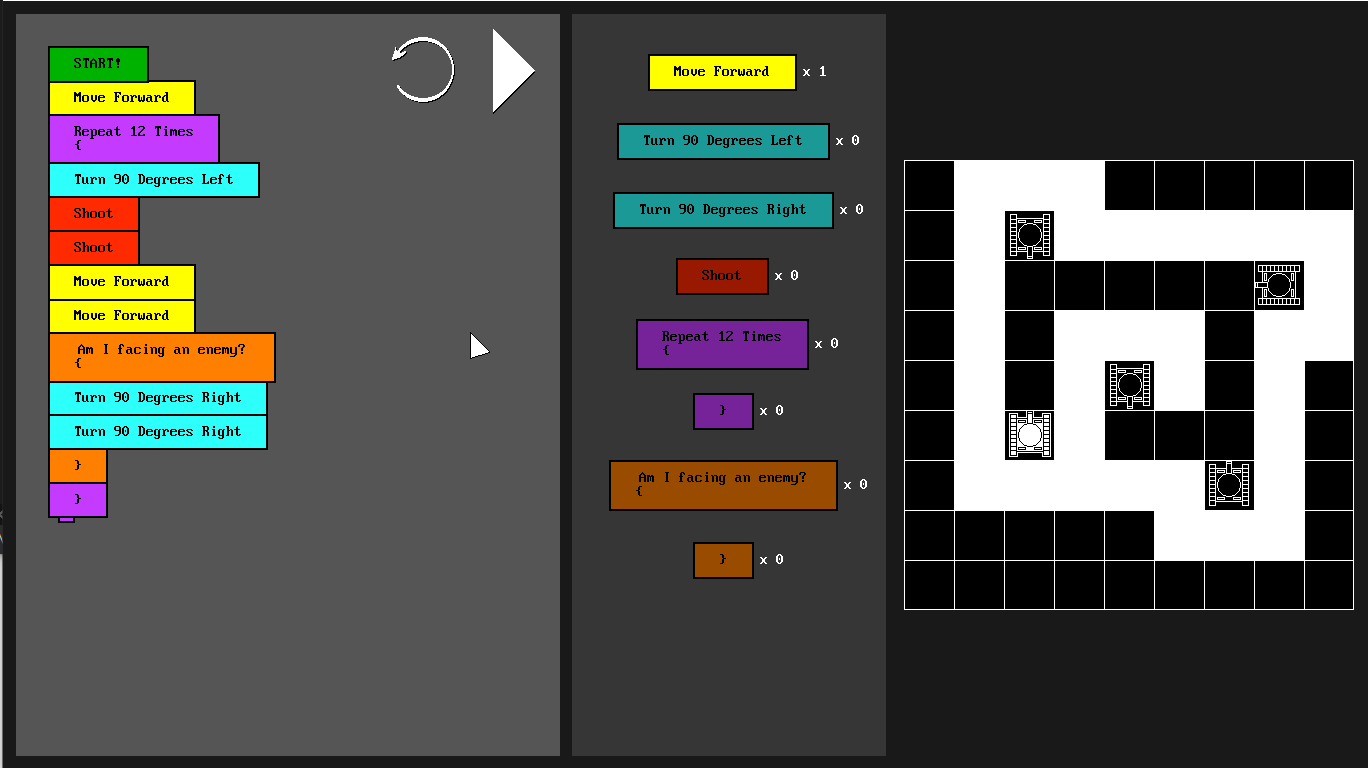
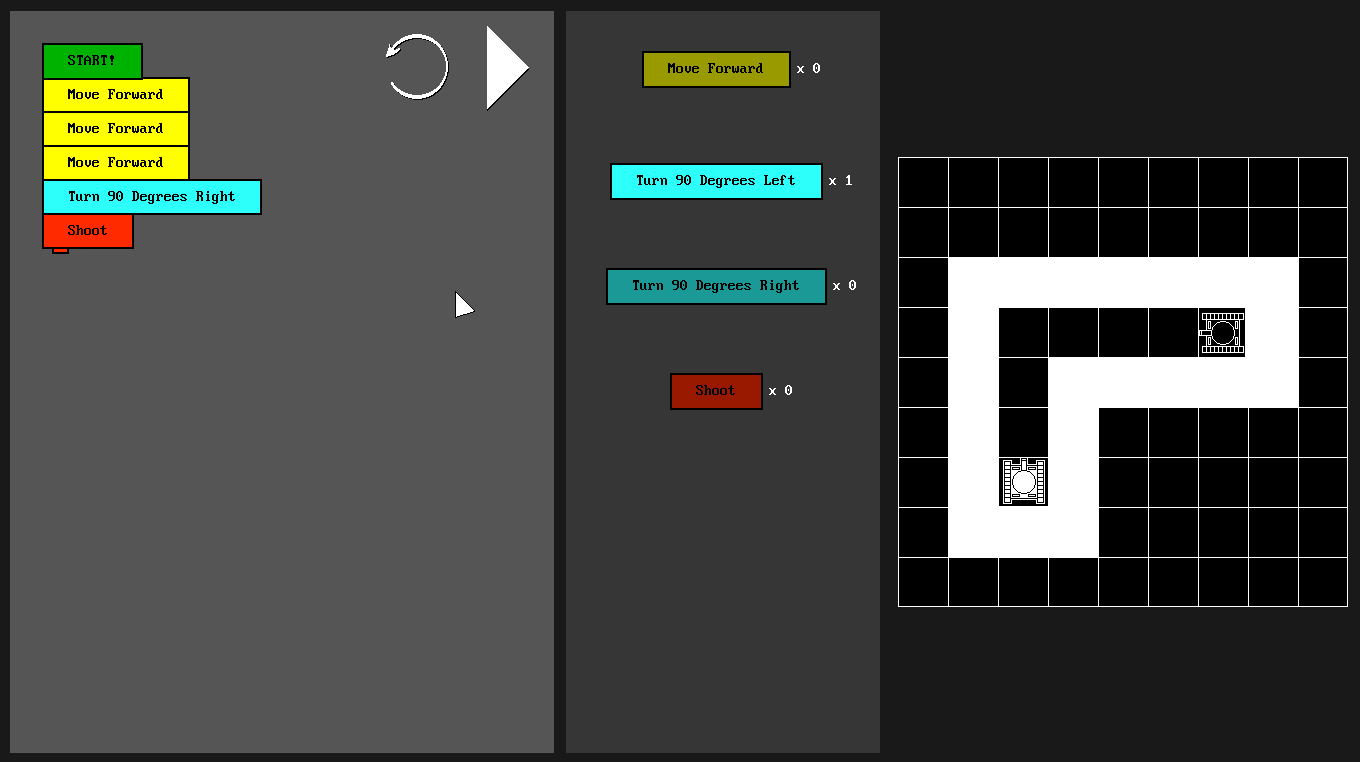
I designed the main workspace of the game to split the screen into three distinct sections. On the left is the build zone, a space where the player will build their chain of code blocks to solve the puzzle. The two white buttons in the corner allow the player to reset the workspace and execute their solution. In the centre of the screen is the players toolbox. This is where the blocks available to the player to solve the current problem are shown and can be clicked on to add them to the chain. Almost each block is a different colour, except blocks with similar functions sharing a colour, such as the commands for turning seen in the photo to the right. There also exists an indicator next to each block showing how many the player may use for each puzzle. On the right of the screen, we may see the puzzle view. The player controls the white tank and must use the commands given to navigate the terrain and destroy the enemy tanks.

After this I added a basic block object into the game. The block object was designed with editable properties, such as function and colour, enabling modularity. This approach allowed for efficient implementation of loops and conditionals as gameplay elements. After programming the puzzle elements and making sure they all interacted correctly, I added a ‘Play’ button to execute the player’s solution. This would then step through the code block by block, ensuring each instruction corresponds the desired effect on the puzzle. With these features in place, I designed three stages and began testing.
Testing and Iterating
During testing, it became apparent that players struggled to follow which block was being executed when running their solution. To address this, I added a feature where the active block is highlighted as the game executes the code, offering immediate visual feedback. I also added a display beneath the puzzle view to show the current block, allowing players to directly associate their logic with the following actions. These changes made the game clearer and easier to follow, helping players see how their code would affect the puzzle. By improving the connection between the code blocks and their outcomes, the game better achieves its goal of teaching logical thinking in an engaging way.
Conclusion
My work in creating “Script and Shell” in Gamemaker Studio and implementing sensory-based learning mechanisms for this assignment has helped me develop my skills in creating educational experiences, considering accessibility and the best ways to gamify learning. In the future, I’d like to expand this game to incorporate more advanced programming concepts, such as functions and variables. I’ve furthered my skills in developing modular systems and best practices, something very applicable to jobs in industry. The project also fits in nicely with my other portfolio pieces, showing my adaptability and ability to produce a diverse range of game genres. Overall, this project strengthens my professional portfolio by showcasing a unique blend of technical and design skills, helping me get closer to my goal of working in the games industry.
Gameplay screenshots